
Note
Go to the end to download the full example code.
Cross-city transferability (v3.2): what survives when a workflow moves to the other city#
This example teaches you how to read the GeoPrior v3.2 cross-city transferability figure.
A model can perform well inside the city where it was trained, but transfer asks a harder question:
How much predictive quality survives when we move the workflow to the other city, and how do strategy and calibration choices change that outcome?
That is exactly what this figure is designed to show.
What the figure shows#
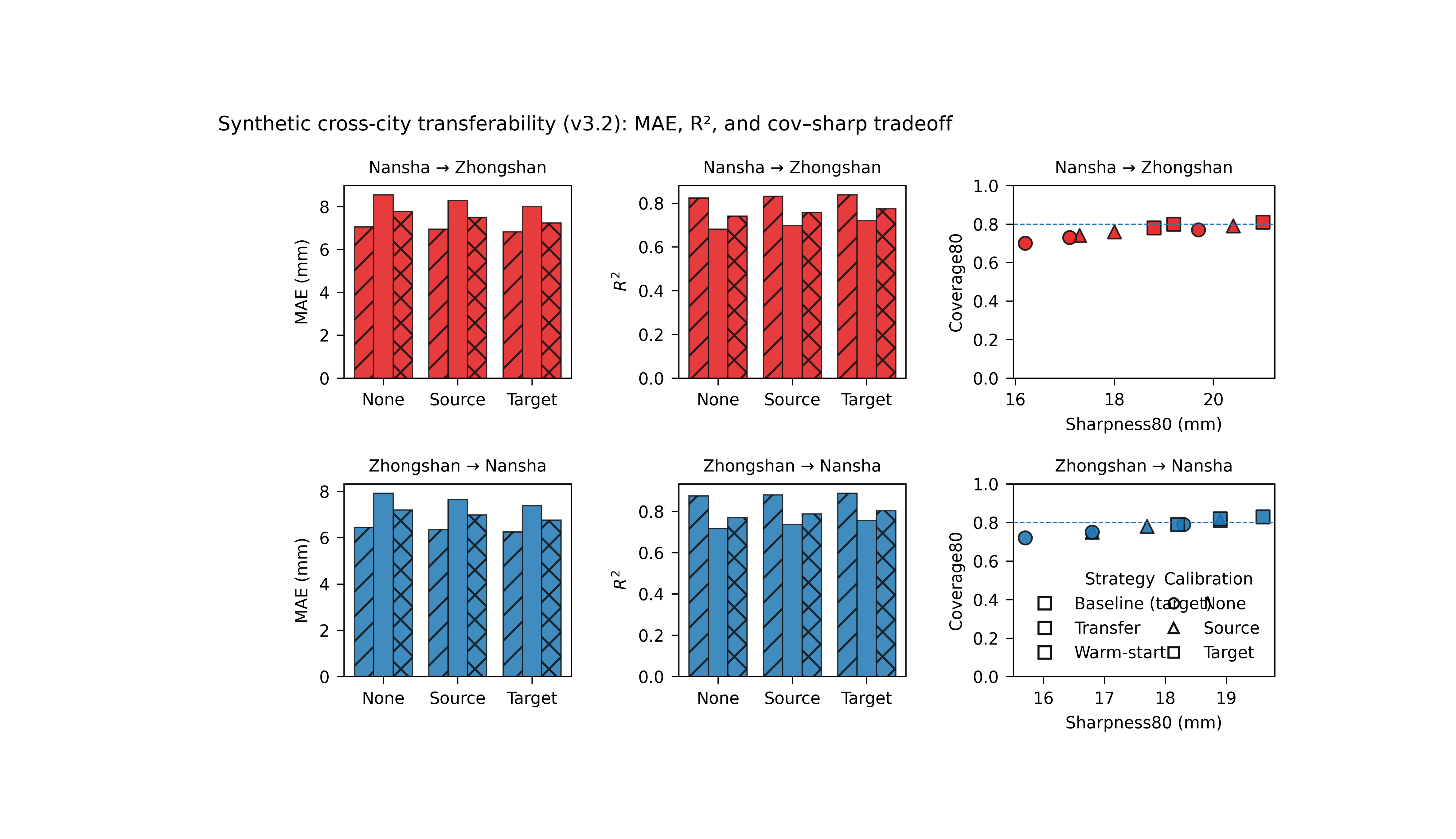
The real plotting backend builds a 2×3 figure.
Rows#
A_to_B
B_to_A
Columns#
a first metric bar panel,
a second metric bar panel,
a coverage–sharpness scatter panel.
In the script itself, the defaults are:
metric_top="mae"metric_bottom="mse"
For a teaching page, we will instead use:
metric_top="mae"metric_bottom="r2"
because MAE + R² is easier to interpret as a transfer lesson.
Why this matters#
A transfer result is never only about one number.
A transferred workflow can change in several ways:
median accuracy can improve or degrade,
calibration can move toward or away from the target,
intervals can become wider or narrower,
and transfer can behave differently in the two directions.
This gallery page builds a compact synthetic transfer-results table so the example is fully executable during documentation builds.
Imports#
We use the real rendering backend from the project script.
Step 1 - Build a compact synthetic transfer table#
The real script expects an xfer_results.csv-like table with columns including:
strategy
rescale_mode
direction
source_city
target_city
split
calibration
overall_mae
overall_mse
overall_r2
coverage80
sharpness80
We create:
baseline rows for A_to_A and B_to_B,
transfer rows for A_to_B and B_to_A,
three calibration modes,
and two transfer strategies: xfer and warm.
The synthetic values are chosen to teach three patterns:
warm transfer usually improves over raw xfer,
target calibration often moves coverage closer to 0.80,
the two directions are not perfectly symmetric.
rows = [
    # ---------------------------------------------------------
    # Baselines
    # These are the target-only references the script fetches
    # internally when plotting transfer rows.
    # ---------------------------------------------------------
    {
        "strategy": "baseline",
        "rescale_mode": "as_is",
        "direction": "A_to_A",
        "source_city": "nansha",
        "target_city": "nansha",
        "split": "val",
        "calibration": "none",
        "overall_mae": 6.45,
        "overall_mse": 75.0,
        "overall_r2": 0.875,
        "coverage80": 0.79,
        "sharpness80": 18.3,
    },
    {
        "strategy": "baseline",
        "rescale_mode": "as_is",
        "direction": "A_to_A",
        "source_city": "nansha",
        "target_city": "nansha",
        "split": "val",
        "calibration": "source",
        "overall_mae": 6.35,
        "overall_mse": 73.4,
        "overall_r2": 0.880,
        "coverage80": 0.81,
        "sharpness80": 18.9,
    },
    {
        "strategy": "baseline",
        "rescale_mode": "as_is",
        "direction": "A_to_A",
        "source_city": "nansha",
        "target_city": "nansha",
        "split": "val",
        "calibration": "target",
        "overall_mae": 6.25,
        "overall_mse": 72.0,
        "overall_r2": 0.888,
        "coverage80": 0.83,
        "sharpness80": 19.6,
    },
    {
        "strategy": "baseline",
        "rescale_mode": "as_is",
        "direction": "B_to_B",
        "source_city": "zhongshan",
        "target_city": "zhongshan",
        "split": "val",
        "calibration": "none",
        "overall_mae": 7.05,
        "overall_mse": 88.5,
        "overall_r2": 0.824,
        "coverage80": 0.77,
        "sharpness80": 19.7,
    },
    {
        "strategy": "baseline",
        "rescale_mode": "as_is",
        "direction": "B_to_B",
        "source_city": "zhongshan",
        "target_city": "zhongshan",
        "split": "val",
        "calibration": "source",
        "overall_mae": 6.95,
        "overall_mse": 86.7,
        "overall_r2": 0.832,
        "coverage80": 0.79,
        "sharpness80": 20.4,
    },
    {
        "strategy": "baseline",
        "rescale_mode": "as_is",
        "direction": "B_to_B",
        "source_city": "zhongshan",
        "target_city": "zhongshan",
        "split": "val",
        "calibration": "target",
        "overall_mae": 6.82,
        "overall_mse": 84.6,
        "overall_r2": 0.839,
        "coverage80": 0.81,
        "sharpness80": 21.0,
    },
    # ---------------------------------------------------------
    # A_to_B transfer rows
    # ---------------------------------------------------------
    {
        "strategy": "xfer",
        "rescale_mode": "strict",
        "direction": "A_to_B",
        "source_city": "nansha",
        "target_city": "zhongshan",
        "split": "val",
        "calibration": "none",
        "overall_mae": 8.55,
        "overall_mse": 115.0,
        "overall_r2": 0.682,
        "coverage80": 0.70,
        "sharpness80": 16.2,
    },
    {
        "strategy": "xfer",
        "rescale_mode": "strict",
        "direction": "A_to_B",
        "source_city": "nansha",
        "target_city": "zhongshan",
        "split": "val",
        "calibration": "source",
        "overall_mae": 8.28,
        "overall_mse": 110.7,
        "overall_r2": 0.699,
        "coverage80": 0.74,
        "sharpness80": 17.3,
    },
    {
        "strategy": "xfer",
        "rescale_mode": "strict",
        "direction": "A_to_B",
        "source_city": "nansha",
        "target_city": "zhongshan",
        "split": "val",
        "calibration": "target",
        "overall_mae": 8.00,
        "overall_mse": 105.5,
        "overall_r2": 0.720,
        "coverage80": 0.78,
        "sharpness80": 18.8,
    },
    {
        "strategy": "warm",
        "rescale_mode": "strict",
        "direction": "A_to_B",
        "source_city": "nansha",
        "target_city": "zhongshan",
        "split": "val",
        "calibration": "none",
        "overall_mae": 7.78,
        "overall_mse": 98.0,
        "overall_r2": 0.742,
        "coverage80": 0.73,
        "sharpness80": 17.1,
    },
    {
        "strategy": "warm",
        "rescale_mode": "strict",
        "direction": "A_to_B",
        "source_city": "nansha",
        "target_city": "zhongshan",
        "split": "val",
        "calibration": "source",
        "overall_mae": 7.50,
        "overall_mse": 93.8,
        "overall_r2": 0.758,
        "coverage80": 0.76,
        "sharpness80": 18.0,
    },
    {
        "strategy": "warm",
        "rescale_mode": "strict",
        "direction": "A_to_B",
        "source_city": "nansha",
        "target_city": "zhongshan",
        "split": "val",
        "calibration": "target",
        "overall_mae": 7.24,
        "overall_mse": 89.7,
        "overall_r2": 0.776,
        "coverage80": 0.80,
        "sharpness80": 19.2,
    },
    # ---------------------------------------------------------
    # B_to_A transfer rows
    # ---------------------------------------------------------
    {
        "strategy": "xfer",
        "rescale_mode": "strict",
        "direction": "B_to_A",
        "source_city": "zhongshan",
        "target_city": "nansha",
        "split": "val",
        "calibration": "none",
        "overall_mae": 7.92,
        "overall_mse": 101.2,
        "overall_r2": 0.718,
        "coverage80": 0.72,
        "sharpness80": 15.7,
    },
    {
        "strategy": "xfer",
        "rescale_mode": "strict",
        "direction": "B_to_A",
        "source_city": "zhongshan",
        "target_city": "nansha",
        "split": "val",
        "calibration": "source",
        "overall_mae": 7.66,
        "overall_mse": 97.0,
        "overall_r2": 0.737,
        "coverage80": 0.75,
        "sharpness80": 16.8,
    },
    {
        "strategy": "xfer",
        "rescale_mode": "strict",
        "direction": "B_to_A",
        "source_city": "zhongshan",
        "target_city": "nansha",
        "split": "val",
        "calibration": "target",
        "overall_mae": 7.38,
        "overall_mse": 92.5,
        "overall_r2": 0.756,
        "coverage80": 0.79,
        "sharpness80": 18.2,
    },
    {
        "strategy": "warm",
        "rescale_mode": "strict",
        "direction": "B_to_A",
        "source_city": "zhongshan",
        "target_city": "nansha",
        "split": "val",
        "calibration": "none",
        "overall_mae": 7.20,
        "overall_mse": 88.8,
        "overall_r2": 0.770,
        "coverage80": 0.75,
        "sharpness80": 16.8,
    },
    {
        "strategy": "warm",
        "rescale_mode": "strict",
        "direction": "B_to_A",
        "source_city": "zhongshan",
        "target_city": "nansha",
        "split": "val",
        "calibration": "source",
        "overall_mae": 6.98,
        "overall_mse": 84.9,
        "overall_r2": 0.788,
        "coverage80": 0.78,
        "sharpness80": 17.7,
    },
    {
        "strategy": "warm",
        "rescale_mode": "strict",
        "direction": "B_to_A",
        "source_city": "zhongshan",
        "target_city": "nansha",
        "split": "val",
        "calibration": "target",
        "overall_mae": 6.76,
        "overall_mse": 81.2,
        "overall_r2": 0.804,
        "coverage80": 0.82,
        "sharpness80": 18.9,
    },
]

df0 = pd.DataFrame(rows)
print("Synthetic transfer table")
print(df0.head(12).to_string(index=False))
Synthetic transfer table
strategy rescale_mode direction source_city target_city split calibration  overall_mae  overall_mse  overall_r2  coverage80  sharpness80
baseline        as_is    A_to_A      nansha      nansha   val        none       6.4500      75.0000      0.8750      0.7900      18.3000
baseline        as_is    A_to_A      nansha      nansha   val      source       6.3500      73.4000      0.8800      0.8100      18.9000
baseline        as_is    A_to_A      nansha      nansha   val      target       6.2500      72.0000      0.8880      0.8300      19.6000
baseline        as_is    B_to_B   zhongshan   zhongshan   val        none       7.0500      88.5000      0.8240      0.7700      19.7000
baseline        as_is    B_to_B   zhongshan   zhongshan   val      source       6.9500      86.7000      0.8320      0.7900      20.4000
baseline        as_is    B_to_B   zhongshan   zhongshan   val      target       6.8200      84.6000      0.8390      0.8100      21.0000
    xfer       strict    A_to_B      nansha   zhongshan   val        none       8.5500     115.0000      0.6820      0.7000      16.2000
    xfer       strict    A_to_B      nansha   zhongshan   val      source       8.2800     110.7000      0.6990      0.7400      17.3000
    xfer       strict    A_to_B      nansha   zhongshan   val      target       8.0000     105.5000      0.7200      0.7800      18.8000
    warm       strict    A_to_B      nansha   zhongshan   val        none       7.7800      98.0000      0.7420      0.7300      17.1000
    warm       strict    A_to_B      nansha   zhongshan   val      source       7.5000      93.8000      0.7580      0.7600      18.0000
    warm       strict    A_to_B      nansha   zhongshan   val      target       7.2400      89.7000      0.7760      0.8000      19.2000
Step 2 - Reload it through the same column normalizer#
The real script canonicalizes column names and types before plotting. We follow that same path here.
tmp_dir = Path(
    tempfile.mkdtemp(prefix="gp_sg_xfer_v32_")
)
csv_path = tmp_dir / "xfer_results.csv"

df0.to_csv(csv_path, index=False)

df = pd.read_csv(csv_path)
df = _canon_cols(df)

print("")
print("Reloaded rows")
print(len(df))
Reloaded rows
18
Step 3 - Read the transfer story before plotting#
A compact summary makes the visual story easier to follow.
Here we find the best calibration mode for MAE within each transfer direction and strategy.
best_rows = []

for direction in ["A_to_B", "B_to_A"]:
    for strategy in ["xfer", "warm"]:
        sub = df.loc[
            df["direction"].eq(direction.lower())
            & df["strategy"].eq(strategy)
            & df["split"].eq("val")
        ].copy()

        i = int(sub["overall_mae"].idxmin())
        best_rows.append(
            {
                "direction": direction,
                "strategy": strategy,
                "best_calibration_for_mae": str(
                    df.loc[i, "calibration"]
                ),
                "best_mae": float(df.loc[i, "overall_mae"]),
                "matched_r2": float(df.loc[i, "overall_r2"]),
                "matched_coverage80": float(
                    df.loc[i, "coverage80"]
                ),
            }
        )

best_df = pd.DataFrame(best_rows)
print("")
print("Best calibration by transfer setting")
print(best_df.to_string(index=False))
Best calibration by transfer setting
direction strategy best_calibration_for_mae  best_mae  matched_r2  matched_coverage80
   A_to_B     xfer                   target    8.0000      0.7200              0.7800
   A_to_B     warm                   target    7.2400      0.7760              0.8000
   B_to_A     xfer                   target    7.3800      0.7560              0.7900
   B_to_A     warm                   target    6.7600      0.8040              0.8200
Step 4 - Render the real v3.2 transfer figure#
We call the actual backend from plot_xfer_transferability.py.
For the gallery lesson:
we keep metric_top = “mae”,
we set metric_bottom = “r2” explicitly,
and we keep only the PNG file afterward.
out_base = tmp_dir / "xfer_transferability_gallery"

png_path, svg_path = render(
    df,
    split="val",
    strategies=["baseline", "xfer", "warm"],
    calib_modes=["none", "source", "target"],
    rescale_mode="strict",
    baseline_rescale="as_is",
    metric_top="mae",
    metric_bottom="r2",
    reduce="best",
    cov_target=0.80,
    out=out_base,
    text=TextFlags(
        show_legend=True,
        show_labels=True,
        show_ticklabels=True,
        show_title=True,
        show_panel_titles=True,
        title=(
            "Synthetic cross-city transferability (v3.2): "
            "MAE, R², and cov–sharp tradeoff"
        ),
    ),
)

# Keep only the PNG in this gallery example.
if Path(svg_path).exists():
    Path(svg_path).unlink()
Step 5 - Show the PNG produced by the backend#
The gallery page displays the actual figure produced by the project plotting code.
img = mpimg.imread(str(png_path))

fig, ax = plt.subplots(figsize=(9.2, 5.3))
ax.imshow(img)
ax.axis("off")
(np.float64(-0.5), np.float64(4395.5), np.float64(2613.5), np.float64(-0.5))
Step 6 - Quantify transfer gaps against target-city baseline#
The transfer figure is easiest to understand when compared against the target-only baseline that the script uses internally.
A_to_B is compared against B_to_B
B_to_A is compared against A_to_A
gap_rows = []

for direction, baseline_dir in [
    ("A_to_B", "B_to_B"),
    ("B_to_A", "A_to_A"),
]:
    base = df.loc[
        df["direction"].eq(baseline_dir.lower())
        & df["strategy"].eq("baseline")
        & df["calibration"].eq("target")
    ].copy()

    b_mae = float(base["overall_mae"].iloc[0])
    b_r2 = float(base["overall_r2"].iloc[0])

    for strategy in ["xfer", "warm"]:
        sub = df.loc[
            df["direction"].eq(direction.lower())
            & df["strategy"].eq(strategy)
        ].copy()
        i = int(sub["overall_mae"].idxmin())

        gap_rows.append(
            {
                "direction": direction,
                "strategy": strategy,
                "calibration": str(df.loc[i, "calibration"]),
                "mae_gap_vs_baseline": float(
                    df.loc[i, "overall_mae"] - b_mae
                ),
                "r2_gap_vs_baseline": float(
                    df.loc[i, "overall_r2"] - b_r2
                ),
            }
        )

gap_df = pd.DataFrame(gap_rows)
print("")
print("Transfer gaps against target-city baseline")
print(gap_df.round(3).to_string(index=False))
Transfer gaps against target-city baseline
direction strategy calibration  mae_gap_vs_baseline  r2_gap_vs_baseline
   A_to_B     xfer      target               1.1800             -0.1190
   A_to_B     warm      target               0.4200             -0.0630
   B_to_A     xfer      target               1.1300             -0.1320
   B_to_A     warm      target               0.5100             -0.0840
Step 7 - Learn how to read the bar columns#
The first two columns are bar panels.
Column 1#
MAE across calibration modes. Lower is better.
Column 2#
R² across calibration modes. Higher is better.
Within each calibration group:
bar fill color follows the target city,
hatching distinguishes strategy,
and the row itself fixes the transfer direction.
That makes the left side of the figure a compact answer to:
“Which strategy–calibration combination gives the best transfer accuracy for this direction?”
Step 8 - Learn how to read the scatter column#
The right column shows the coverage–sharpness tradeoff for each transfer direction.
This panel matters because transfer quality is not only about MAE or R².
A transferred workflow can look better on a point metric while:
under-covering badly,
or recovering coverage only by becoming much wider.
The dashed horizontal line marks the target coverage of 0.80. A good point sits:
near that line,
with as little sharpness penalty as possible.
Step 9 - What this synthetic example teaches#
In this lesson we intentionally created three patterns:
warm transfer is usually better than raw xfer,
target calibration tends to improve coverage80,
the two transfer directions behave differently.
That third point is important.
Transfer from Nansha to Zhongshan is not automatically the same as transfer from Zhongshan to Nansha. The figure keeps the two directions separate so the reader can see that clearly.
Step 10 - Practical takeaway#
This v3.2 transfer figure is useful because it combines:
cross-city accuracy,
cross-city calibration,
directionality,
and strategy choice
in one compact page.
In practice, it helps answer:
Does warm transfer help?
Which calibration mode is safest after transfer?
Is one transfer direction easier than the other?
How close can transfer get to the target-city baseline?
Command-line version#
The same figure can be produced from the command line.
The real script supports:
--srcor--xfer-csv,--splitwithvalortest,--strategies,--calib-modes,--rescale-modeand--baseline-rescale,--metric-topand--metric-bottom,--reducewithbest | mean | median,--cov-target,plus the shared plot text flags.
Legacy dispatcher:
python -m scripts plot-xfer-transferability \
  --src results/xfer/nansha__zhongshan \
  --split val \
  --strategies baseline xfer warm \
  --calib-modes none source target \
  --rescale-mode strict \
  --baseline-rescale as_is \
  --metric-top mae \
  --metric-bottom r2 \
  --reduce best \
  --cov-target 0.80 \
  --out xfer_transferability
Explicit CSV:
python -m scripts plot-xfer-transferability \
  --xfer-csv results/xfer/nansha__zhongshan/latest/xfer_results.csv \
  --split test \
  --metric-top mae \
  --metric-bottom mse \
  --out xfer_transferability
Modern CLI:
geoprior plot xfer-transferability \
  --src results/xfer/nansha__zhongshan \
  --split val \
  --metric-bottom r2 \
  --out xfer_transferability
The gallery page teaches the figure. The command line reproduces it in a workflow.
Total running time of the script: (0 minutes 3.135 seconds)