
Note
Go to the end to download the full example code.
Plot physics loss terms from a GeoPrior training history#
This example teaches you how to use GeoPrior’s
plot_physics_losses_in helper.
Unlike the publication-oriented scripts in figure_generation/,
this function is a compact model-inspection utility. It focuses only
on the physics loss terms and related diagnostics stored in a
training history.
Why this matters#
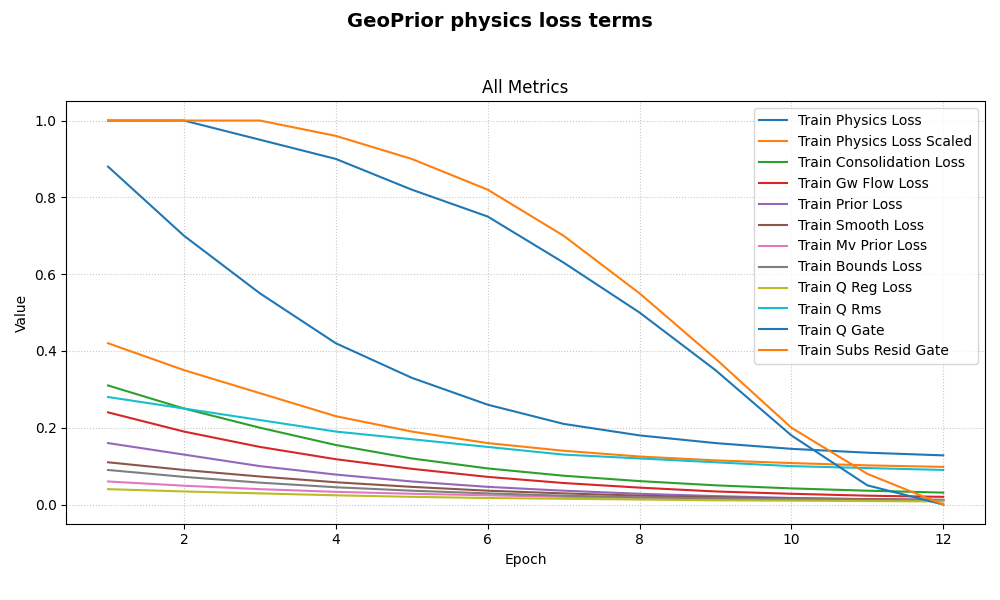
GeoPrior histories can contain many metrics, but when you want to inspect the physics side of training, the most useful view is often a single panel containing the main physics loss terms:
the raw and scaled physics objectives,
PDE residual losses,
prior and bounds penalties,
and optional forcing diagnostics.
This helper does exactly that.
Imports#
We call the real plotting helper from the package and feed it a compact synthetic history dictionary.
from __future__ import annotations

import tempfile
from pathlib import Path

import numpy as np

from geoprior.models import plot_physics_losses_in
Build a compact synthetic history#
The real helper accepts a Keras History or a plain dict.
For the lesson page, a plain dict is enough.
We include:
the canonical physics loss keys used by the helper,
a few optional diagnostics,
unrelated keys that should be ignored by this helper,
and one gate term that touches zero so the requested log scale can safely fall back to
symlogwhen necessary.
epochs = np.arange(1, 13, dtype=int)

history = {
    "loss": (
        np.array(
            [2.30, 1.88, 1.53, 1.27, 1.06, 0.91,
             0.81, 0.73, 0.67, 0.63, 0.60, 0.58]
        )
    ).tolist(),
    "val_loss": (
        np.array(
            [2.48, 2.01, 1.66, 1.39, 1.19, 1.04,
             0.95, 0.88, 0.84, 0.81, 0.79, 0.78]
        )
    ).tolist(),
    "physics_loss": (
        np.array(
            [0.88, 0.70, 0.55, 0.42, 0.33, 0.26,
             0.21, 0.18, 0.16, 0.145, 0.135, 0.128]
        )
    ).tolist(),
    "physics_loss_scaled": (
        np.array(
            [0.42, 0.35, 0.29, 0.23, 0.19, 0.16,
             0.14, 0.125, 0.115, 0.108, 0.102, 0.098]
        )
    ).tolist(),
    "consolidation_loss": (
        np.array(
            [0.31, 0.25, 0.20, 0.155, 0.120, 0.094,
             0.075, 0.061, 0.050, 0.042, 0.036, 0.031]
        )
    ).tolist(),
    "gw_flow_loss": (
        np.array(
            [0.24, 0.19, 0.15, 0.118, 0.093, 0.072,
             0.056, 0.044, 0.034, 0.028, 0.023, 0.020]
        )
    ).tolist(),
    "prior_loss": (
        np.array(
            [0.16, 0.13, 0.10, 0.078, 0.060, 0.046,
             0.036, 0.028, 0.022, 0.017, 0.014, 0.012]
        )
    ).tolist(),
    "smooth_loss": (
        np.array(
            [0.11, 0.090, 0.073, 0.058, 0.046, 0.036,
             0.029, 0.023, 0.019, 0.016, 0.014, 0.012]
        )
    ).tolist(),
    "mv_prior_loss": (
        np.array(
            [0.060, 0.049, 0.040, 0.033, 0.028, 0.024,
             0.020, 0.017, 0.015, 0.013, 0.012, 0.011]
        )
    ).tolist(),
    "bounds_loss": (
        np.array(
            [0.090, 0.072, 0.057, 0.045, 0.036, 0.029,
             0.023, 0.019, 0.016, 0.014, 0.012, 0.011]
        )
    ).tolist(),
    "q_reg_loss": (
        np.array(
            [0.040, 0.034, 0.029, 0.024, 0.020, 0.017,
             0.015, 0.013, 0.011, 0.010, 0.009, 0.008]
        )
    ).tolist(),
    "q_rms": (
        np.array(
            [0.28, 0.25, 0.22, 0.19, 0.17, 0.15,
             0.13, 0.12, 0.11, 0.10, 0.095, 0.090]
        )
    ).tolist(),
    "q_gate": (
        np.array(
            [1.0, 1.0, 0.95, 0.90, 0.82, 0.75,
             0.63, 0.50, 0.35, 0.18, 0.05, 0.00]
        )
    ).tolist(),
    "subs_resid_gate": (
        np.array(
            [1.0, 1.0, 1.0, 0.96, 0.90, 0.82,
             0.70, 0.55, 0.38, 0.20, 0.08, 0.00]
        )
    ).tolist(),
}

print("History keys")
for k in history:
    print(" -", k)
History keys
 - loss
 - val_loss
 - physics_loss
 - physics_loss_scaled
 - consolidation_loss
 - gw_flow_loss
 - prior_loss
 - smooth_loss
 - mv_prior_loss
 - bounds_loss
 - q_reg_loss
 - q_rms
 - q_gate
 - subs_resid_gate
Plot the physics-loss dashboard directly#
The helper automatically:
keeps only the known physics-loss keys,
ignores unrelated history terms,
groups the survivors into one panel called
Physics,and requests log-like scaling.
Because some gate values approach zero, the underlying history
plotter can safely switch to symlog when needed.
plot_physics_losses_in(
    history,
    title="GeoPrior physics loss terms",
    style="default",
)
Save the physics-loss figure#
When savefig has no extension, the underlying plot helper adds
.png automatically.
[OK] Saved figure -> /tmp/gp_sg_plot_phys_losses_lmul22ui/physics_terms.png

Saved file
 - /tmp/gp_sg_plot_phys_losses_lmul22ui/physics_terms.png
Show what the helper is selecting#
The real helper uses a fixed preferred key list and then keeps only the entries that actually exist in the history.
candidate_keys = [
    "physics_loss",
    "physics_loss_scaled",
    "consolidation_loss",
    "gw_flow_loss",
    "prior_loss",
    "smooth_loss",
    "mv_prior_loss",
    "bounds_loss",
    "q_reg_loss",
    "q_rms",
    "q_gate",
    "subs_resid_gate",
]

selected = [k for k in candidate_keys if k in history]

print("")
print("Selected physics keys")
for k in selected:
    print(" -", k)
Selected physics keys
 - physics_loss
 - physics_loss_scaled
 - consolidation_loss
 - gw_flow_loss
 - prior_loss
 - smooth_loss
 - mv_prior_loss
 - bounds_loss
 - q_reg_loss
 - q_rms
 - q_gate
 - subs_resid_gate
Learn how to read the physics panel#
A useful reading order is:
compare
physics_lossandphysics_loss_scaledto see how strongly the global physics objective is contributing;compare
consolidation_lossandgw_flow_lossto see which PDE family is dominating;inspect
prior_loss,smooth_loss,mv_prior_loss, andbounds_lossto see which regularizers remain active late in training;inspect
q_*andsubs_resid_gateonly when those optional diagnostics are enabled in the run.
This gives a much cleaner view than mixing these terms into a full all-metrics dashboard.
Why the raw and scaled physics losses both matter#
GeoPrior logs both:
physics_loss: the raw aggregated physics objective,physics_loss_scaled: the actual contribution after the offset-aware multiplier.
Looking at both helps separate:
whether the underlying residual magnitudes are shrinking,
from whether the optimizer is currently giving those terms a strong contribution.
Why the gate diagnostics are useful#
Optional keys such as:
q_gatesubs_resid_gate
are not losses in the usual sense. They are control or schedule diagnostics.
But plotting them beside the other physics terms is still useful, because they help explain why a regularizer or residual family may appear to switch on, ramp up, or saturate during training.
Why this page belongs in model_inspection#
This helper is not building a paper figure and it is not exporting a reusable artifact.
Its role is to inspect the internal physics side of optimization.
So it belongs naturally with the other model-inspection helpers.
A natural next lesson#
The clean next page after this is autoplot_geoprior_history.py,
because that helper simply automates the saving of:
the epsilon dashboard,
and the physics-loss dashboard.
Total running time of the script: (0 minutes 0.645 seconds)