
Note
Go to the end to download the full example code.
Build one merged full_inputs.npz from Stage-1 split artifacts#
This lesson teaches how to use GeoPrior’s
full-inputs-npz build command.
Unlike the earlier tabular builders, this command does not produce a
CSV or a summary table. Instead, it collects the split NPZ inputs
written by Stage-1 and merges them into one compressed archive such as
full_inputs.npz.
Why this matters#
Many downstream tasks need a single bundle of arrays rather than three separate train/validation/test NPZ files. For example, you may want to:
inspect the full input payload quickly,
pass one archive to another utility,
archive a compact all-splits artifact,
or debug shape mismatches across splits.
That is exactly what full-inputs-npz is for.
Imports#
We call the real production CLI entrypoint from the package. For the synthetic lesson input, we build a minimal Stage-1 directory with:
three split NPZ files,
one manifest.json,
and one artifacts/ folder where the merged file will be written.
from __future__ import annotations

import json
import tempfile
from pathlib import Path

import matplotlib.pyplot as plt
import numpy as np

from geoprior.cli.build_full_inputs_npz import (
    build_full_inputs_main,
)
Step 1 - Build a compact synthetic Stage-1 directory#
full-inputs-npz is manifest-driven. The command does not guess
split file names directly from the filesystem; instead it reads a
Stage-1 manifest.json and looks under:
manifest["artifacts"]["numpy"]["<split>_inputs_npz"]
for each requested split.
We therefore create a tiny but realistic Stage-1 folder with three split NPZ files and one manifest that points to them.
The synthetic arrays below mimic a typical forecasting payload:
x_static: one row per sample, fixed features,x_dynamic: one row per sample with a short time axis,y: one target per sample,coords: sample coordinates,years: reference year per sample.
The parameter comments are intentionally explicit so the user sees how the lesson data are constructed.
rng = np.random.default_rng(2026)

tmp_dir = Path(
    tempfile.mkdtemp(prefix="gp_sg_full_inputs_npz_")
)
stage1_dir = tmp_dir / "zhongshan_geoprior_stage1"
stage1_dir.mkdir(parents=True, exist_ok=True)
artifacts_dir = stage1_dir / "artifacts"
artifacts_dir.mkdir(parents=True, exist_ok=True)


# Small helper to build one split payload.
#
# Parameters
# ----------
# n:
#     Number of samples in the split.
# seed_shift:
#     Small offset so train/val/test are not identical.
# time_steps:
#     Number of dynamic lookback steps.
# n_static:
#     Number of static features.
# n_dynamic:
#     Number of dynamic features.
def make_split_payload(
    *,
    n: int,
    seed_shift: int,
    time_steps: int = 4,
    n_static: int = 3,
    n_dynamic: int = 2,
) -> dict[str, np.ndarray]:
    rr = np.random.default_rng(2026 + seed_shift)

    x_static = rr.normal(
        loc=0.0 + 0.05 * seed_shift,
        scale=1.0,
        size=(n, n_static),
    ).astype(np.float32)

    x_dynamic = rr.normal(
        loc=0.2 * seed_shift,
        scale=0.9,
        size=(n, time_steps, n_dynamic),
    ).astype(np.float32)

    coords = np.column_stack(
        [
            rr.uniform(113.18, 113.56, size=n),
            rr.uniform(22.28, 22.66, size=n),
        ]
    ).astype(np.float32)

    years = rr.integers(
        low=2019,
        high=2025,
        size=n,
        endpoint=False,
    ).astype(np.int32)

    # A simple synthetic target coupled loosely to the inputs.
    y = (
        0.45 * x_static[:, [0]]
        + 0.18 * x_dynamic[:, -1, [0]]
        + 0.08 * x_dynamic[:, -2, [1]]
        + rr.normal(0.0, 0.08, size=(n, 1))
    ).astype(np.float32)

    return {
        "x_static": x_static,
        "x_dynamic": x_dynamic,
        "y": y,
        "coords": coords,
        "years": years,
    }


split_specs = {
    "train": {"n": 72, "seed_shift": 0},
    "val": {"n": 24, "seed_shift": 1},
    "test": {"n": 28, "seed_shift": 2},
}

split_paths: dict[str, Path] = {}
for split, spec in split_specs.items():
    payload = make_split_payload(**spec)
    path = artifacts_dir / f"{split}_inputs.synthetic.npz"
    np.savez_compressed(path, **payload)
    split_paths[split] = path.resolve()

manifest = {
    "stage": "stage1",
    "city": "Zhongshan",
    "model": "GeoPriorSubsNet",
    "artifacts": {
        "numpy": {
            "train_inputs_npz": str(split_paths["train"]),
            "val_inputs_npz": str(split_paths["val"]),
            "test_inputs_npz": str(split_paths["test"]),
        }
    },
}

manifest_path = stage1_dir / "manifest.json"
manifest_path.write_text(
    json.dumps(manifest, indent=2),
    encoding="utf-8",
)

print("Synthetic Stage-1 directory")
print(f" - stage1_dir : {stage1_dir}")
print(f" - manifest   : {manifest_path}")
print(" - split NPZ files")
for split, path in split_paths.items():
    print(f"   - {split:5s}: {path.name}")
Synthetic Stage-1 directory
 - stage1_dir : /tmp/gp_sg_full_inputs_npz_h79x20yz/zhongshan_geoprior_stage1
 - manifest   : /tmp/gp_sg_full_inputs_npz_h79x20yz/zhongshan_geoprior_stage1/manifest.json
 - split NPZ files
   - train: train_inputs.synthetic.npz
   - val  : val_inputs.synthetic.npz
   - test : test_inputs.synthetic.npz
Step 2 - Inspect the split payloads before merging#
Before calling the builder, it is useful to confirm what each split
contains. Because full-inputs-npz concatenates arrays along
axis=0, the main thing to check is whether the keys and shapes are
compatible across splits.
split_arrays: dict[str, dict[str, np.ndarray]] = {}
for split, path in split_paths.items():
    with np.load(path, allow_pickle=False) as z:
        split_arrays[split] = {k: z[k] for k in z.files}

print("")
print("Split payload overview")
for split, arrays in split_arrays.items():
    print(f"[{split}]")
    for key, value in sorted(arrays.items()):
        print(f" - {key:10s}: {tuple(value.shape)}")
Split payload overview
[train]
 - coords    : (72, 2)
 - x_dynamic : (72, 4, 2)
 - x_static  : (72, 3)
 - y         : (72, 1)
 - years     : (72,)
[val]
 - coords    : (24, 2)
 - x_dynamic : (24, 4, 2)
 - x_static  : (24, 3)
 - y         : (24, 1)
 - years     : (24,)
[test]
 - coords    : (28, 2)
 - x_dynamic : (28, 4, 2)
 - x_static  : (28, 3)
 - y         : (28, 1)
 - years     : (28,)
Step 3 - Run the real full-inputs-npz command#
We now call the public CLI entrypoint exactly as a user would.
Here we use --stage1-dir because it is the clearest lesson path:
the command will resolve manifest.json, read the split NPZ paths,
concatenate the arrays in split order, and write the merged file under
<stage1_dir>/artifacts/ when --output is omitted.
build_full_inputs_main(
    [
        "--stage1-dir",
        str(stage1_dir),
        "--splits",
        "train",
        "val",
        "test",
    ]
)
Saved: /tmp/gp_sg_full_inputs_npz_h79x20yz/zhongshan_geoprior_stage1/artifacts/full_inputs.npz
coords: (124, 2)
x_dynamic: (124, 4, 2)
x_static: (124, 3)
y: (124, 1)
years: (124,)
Step 4 - Read the merged NPZ back in#
The default output name is full_inputs.npz under the Stage-1
artifacts/ folder. We load it back in and inspect the merged
shapes.
merged_npz = artifacts_dir / "full_inputs.npz"
with np.load(merged_npz, allow_pickle=False) as z:
    merged = {k: z[k] for k in z.files}

print("")
print(f"Merged output: {merged_npz}")
print("Merged array shapes")
for key, value in sorted(merged.items()):
    print(f" - {key:10s}: {tuple(value.shape)}")
Merged output: /tmp/gp_sg_full_inputs_npz_h79x20yz/zhongshan_geoprior_stage1/artifacts/full_inputs.npz
Merged array shapes
 - coords    : (124, 2)
 - x_dynamic : (124, 4, 2)
 - x_static  : (124, 3)
 - y         : (124, 1)
 - years     : (124,)
Step 5 - Verify that the concatenation did what we expect#
A good lesson should make the merge logic concrete. We therefore build a compact check table showing:
the train contribution,
the validation contribution,
the test contribution,
and the merged axis-0 size.
For this builder, the merged axis-0 size should equal the sum of the requested splits for every key.
rows: list[dict[str, int | str]] = []
for key in sorted(merged):
    train_n = int(split_arrays["train"][key].shape[0])
    val_n = int(split_arrays["val"][key].shape[0])
    test_n = int(split_arrays["test"][key].shape[0])
    merged_n = int(merged[key].shape[0])

    rows.append(
        {
            "array": key,
            "train": train_n,
            "val": val_n,
            "test": test_n,
            "merged": merged_n,
        }
    )

print("")
print("Axis-0 merge check")
for row in rows:
    print(
        f" - {row['array']:10s}: "
        f"train={row['train']:3d}, "
        f"val={row['val']:3d}, "
        f"test={row['test']:3d}, "
        f"merged={row['merged']:3d}"
    )
Axis-0 merge check
 - coords    : train= 72, val= 24, test= 28, merged=124
 - x_dynamic : train= 72, val= 24, test= 28, merged=124
 - x_static  : train= 72, val= 24, test= 28, merged=124
 - y         : train= 72, val= 24, test= 28, merged=124
 - years     : train= 72, val= 24, test= 28, merged=124
Step 6 - Build one compact preview figure#
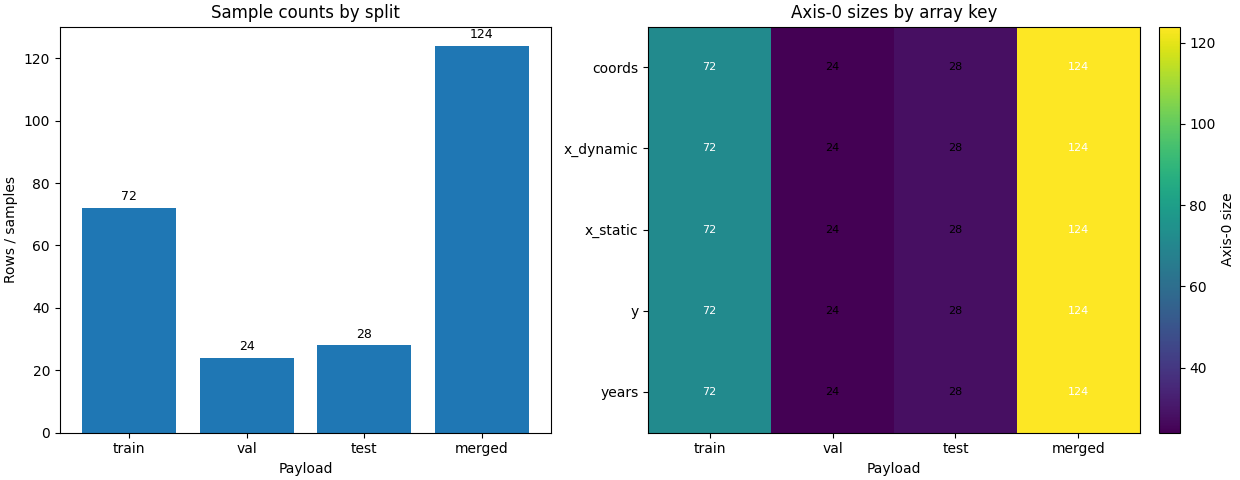
The command itself writes an NPZ file, not a figure. For the gallery, we add one compact visual summary so the page is easier to read.
- Left:
sample counts by split and merged output.
- Right:
a small heatmap showing axis-0 sizes per array key.
sample_counts = {
    "train": split_specs["train"]["n"],
    "val": split_specs["val"]["n"],
    "test": split_specs["test"]["n"],
    "merged": sum(spec["n"] for spec in split_specs.values()),
}

heat_keys = [row["array"] for row in rows]
heat_data = np.array(
    [
        [row["train"], row["val"], row["test"], row["merged"]]
        for row in rows
    ],
    dtype=float,
)

fig, axes = plt.subplots(
    1,
    2,
    figsize=(12.4, 4.8),
    constrained_layout=True,
)

ax = axes[0]
labels = list(sample_counts)
values = [sample_counts[k] for k in labels]
ax.bar(labels, values)
ax.set_title("Sample counts by split")
ax.set_ylabel("Rows / samples")
ax.set_xlabel("Payload")
for i, v in enumerate(values):
    ax.text(
        i,
        v + 1.5,
        str(v),
        ha="center",
        va="bottom",
        fontsize=9,
    )

ax = axes[1]
im = ax.imshow(heat_data, aspect="auto")
ax.set_title("Axis-0 sizes by array key")
ax.set_xticks(range(4))
ax.set_xticklabels(["train", "val", "test", "merged"])
ax.set_yticks(range(len(heat_keys)))
ax.set_yticklabels(heat_keys)
ax.set_xlabel("Payload")

for i in range(heat_data.shape[0]):
    for j in range(heat_data.shape[1]):
        ax.text(
            j,
            i,
            f"{int(heat_data[i, j])}",
            ha="center",
            va="center",
            fontsize=8,
            color="white" if heat_data[i, j] > 60 else "black",
        )

cbar = fig.colorbar(im, ax=ax, fraction=0.046, pad=0.04)
cbar.set_label("Axis-0 size")
How to read this result#
The merged NPZ is not a mysterious black box. It is simply the split
payloads stacked in the order requested by --splits.
In this lesson:
each array key is preserved,
the non-leading dimensions stay unchanged,
and the leading dimension grows from
train + val + testto one merged archive.
That is why this builder is a useful bridge between Stage-1 exports and later inspection or packaging tasks.
Practical takeaway#
Use full-inputs-npz when you already trust the split artifacts and
want one compact archive for debugging, exchange, or downstream tools.
Before running it on real data, it is worth checking two things:
the manifest points to the intended split NPZ files;
the splits expose compatible keys unless you deliberately use
--allow-missing-keys.
If the command raises an input-key mismatch, that is usually a useful diagnostic rather than a nuisance: it means your Stage-1 splits were not exported consistently.
Command-line version#
The same lesson can be reproduced from the terminal.
Most direct path:
geoprior-build full-inputs-npz \
  --stage1-dir results/zhongshan_GeoPriorSubsNet_stage1 \
  --splits train val test
Equivalent root dispatcher:
geoprior build full-inputs-npz \
  --stage1-dir results/zhongshan_GeoPriorSubsNet_stage1 \
  --splits train val test
Resolve the manifest automatically from results/ + city + model:
geoprior build full-inputs-npz \
  --results-dir results \
  --city zhongshan \
  --model GeoPriorSubsNet
Write to a custom path and allow non-identical split keys:
geoprior-build full-inputs-npz \
  --stage1-dir results/zhongshan_GeoPriorSubsNet_stage1 \
  --output scripts/out/zhongshan_full_inputs_debug.npz \
  --allow-missing-keys
The gallery page teaches the command. The terminal form reproduces it in a real workflow.
Total running time of the script: (0 minutes 0.271 seconds)