
Note
Go to the end to download the full example code.
Inspect a Stage-2 run manifest before downstream workflow steps#
This lesson explains how to inspect the lightweight
run_manifest.json artifact written around Stage-2 training.
Compared with the richer Stage-1 manifest.json, the run manifest
is intentionally compact. It is a workflow-level checkpoint that helps
answer practical questions such as:
Which training run does this file describe?
What small config snapshot was preserved with the run?
Which paths point to the best model, final model, CSV log, and model-init manifest?
Do the nested scaling conventions still look coherent with the trained run?
Does the exported bundle look complete enough for evaluation, inference, or later CLI build commands?
The goal of this page is not only to call plotting helpers. It is to teach how to read the run manifest step by step, understand what each view means, and decide whether the saved Stage-2 bundle looks trustworthy enough for the next task.
from __future__ import annotations

import json
import tempfile
from pathlib import Path
from pprint import pprint

import matplotlib.pyplot as plt
import pandas as pd

from geoprior.utils.inspect import (
    generate_run_manifest,
    inspect_run_manifest,
    load_run_manifest,
    plot_run_manifest_boolean_summary,
    plot_run_manifest_coord_ranges,
    plot_run_manifest_feature_group_sizes,
    plot_run_manifest_path_inventory,
    run_manifest_artifacts_frame,
    run_manifest_config_frame,
    run_manifest_identity_frame,
    run_manifest_paths_frame,
    run_manifest_scaling_overview_frame,
    summarize_run_manifest,
)

pd.set_option("display.max_columns", 24)
pd.set_option("display.width", 98)


RUN_MANIFEST_PALETTE = {
    "inventory": "#1D4ED8",
    "features": "#0F766E",
    "coords": "#7C3AED",
    "pass": "#15803D",
    "fail": "#B91C1C",
    "edge": "#1E293B",
    "panel": "#FBFCFE",
}


def _style_bar_panel(
    ax: plt.Axes,
    *,
    color: str,
    edge: str = RUN_MANIFEST_PALETTE["edge"],
) -> None:
    """Polish a bar-based gallery panel."""
    for patch in ax.patches:
        patch.set_facecolor(color)
        patch.set_edgecolor(edge)
        patch.set_linewidth(1.25)
        patch.set_alpha(0.94)
    ax.set_facecolor(RUN_MANIFEST_PALETTE["panel"])
    ax.tick_params(labelsize=9)
    ax.title.set_fontweight("bold")
    for side in ("top", "right"):
        ax.spines[side].set_visible(False)
    for side in ("left", "bottom"):
        ax.spines[side].set_color("#CBD5E1")


def _style_boolean_panel(ax: plt.Axes) -> None:
    """Apply a distinct pass/fail palette to boolean panels."""
    for patch in ax.patches:
        width = patch.get_width()
        height = patch.get_height()
        score = width if width != 0 else height
        color = (
            RUN_MANIFEST_PALETTE["pass"]
            if score >= 0.5
            else RUN_MANIFEST_PALETTE["fail"]
        )
        patch.set_facecolor(color)
        patch.set_edgecolor(RUN_MANIFEST_PALETTE["edge"])
        patch.set_linewidth(1.15)
        patch.set_alpha(0.94)
    ax.set_facecolor(RUN_MANIFEST_PALETTE["panel"])
    ax.tick_params(labelsize=9)
    ax.title.set_fontweight("bold")
    for side in ("top", "right"):
        ax.spines[side].set_visible(False)
    for side in ("left", "bottom"):
        ax.spines[side].set_color("#CBD5E1")
Why this artifact matters#
After Stage-2 training, users often do not want to reopen every large artifact just to know whether a run completed correctly.
The run manifest is useful because it acts like a small index card for the trained run. It keeps the most important pieces close together:
run identity,
compact config choices,
essential scaling context,
the exported path bundle,
direct pointers to a few downstream artifacts.
In practice, this means you can inspect one small JSON file first, then decide whether it is worth opening larger files such as the training summary, CSV log, model-init manifest, or evaluation outputs.
Create a realistic demo run manifest#
For documentation pages, we want a stable example that looks like a real Stage-2 output without re-running training.
The generation helper creates that kind of artifact. The result is not a full training replay. Instead, it is a realistic run-manifest payload with the same broad structure users should expect from a saved run.
out_dir = Path(tempfile.mkdtemp(prefix="gp_run_manifest_"))
manifest_path = out_dir / "run_manifest.json"

generate_run_manifest(
    manifest_path,
    overrides={
        "stage": "stage-2-train",
        "city": "nansha",
        "model": "GeoPriorSubsNet",
        "config": {
            "TIME_STEPS": 5,
            "FORECAST_HORIZON_YEARS": 3,
            "MODE": "tft_like",
            "PDE_MODE_CONFIG": "on",
            "identifiability_regime": "anchored",
        },
    },
)

print("Written run manifest")
print(f" - {manifest_path}")
Written run manifest
 - /tmp/gp_run_manifest_wzdt3vz7/run_manifest.json
Load the artifact with the real reader#
Even inside a lesson, it is useful to use the same entry point a
real user would use when opening a saved run_manifest.json.
This keeps the example honest: we inspect the artifact through the same public helper rather than relying on private assumptions.
run_record = load_run_manifest(manifest_path)

print("\nArtifact header")
pprint(
    {
        "kind": run_record.kind,
        "stage": run_record.stage,
        "city": run_record.city,
        "model": run_record.model,
        "path": str(run_record.path),
    }
)
Artifact header
{'city': 'nansha',
 'kind': 'run_manifest',
 'model': 'GeoPriorSubsNet',
 'path': '/tmp/gp_run_manifest_wzdt3vz7/run_manifest.json',
 'stage': 'stage-2-train'}
Start with the compact summary#
A good inspection habit is to read the semantic summary first.
This summary is the quickest way to answer the first workflow question:
Does this saved run look structurally complete enough to use for later actions such as evaluation, inference, export, or plotting?
At this stage, we are not yet checking whether the model is good. We are checking whether the bundle itself looks coherent.
summary = summarize_run_manifest(run_record)

print("\nCompact summary")
print(json.dumps(summary, indent=2))
Compact summary
{
  "stage": "stage-2-train",
  "city": "nansha",
  "model": "GeoPriorSubsNet",
  "time_steps": 5,
  "forecast_horizon_years": 3,
  "mode": "tft_like",
  "pde_mode_config": "on",
  "identifiability_regime": "anchored",
  "quantiles": [
    0.1,
    0.5,
    0.9
  ],
  "attention_levels": [
    "cross",
    "hierarchical",
    "memory"
  ],
  "time_units": "year",
  "coords_normalized": true,
  "coords_in_degrees": false,
  "coord_ranges": {
    "t": 7.0,
    "x": 44447.0,
    "y": 39275.0
  },
  "dynamic_feature_count": 5,
  "future_feature_count": 1,
  "static_feature_count": 12,
  "bounds_count": 14,
  "path_count": 8,
  "artifact_count": 2,
  "has_final_keras": true,
  "has_model_init_manifest": true,
  "has_best_keras": true,
  "has_best_weights": true
}
Read the identity and config views#
The identity frame answers which run we are looking at.
The compact config frame answers what high-level choices this run was built with:
time steps,
forecast horizon,
sequence mode,
PDE mode setting,
attention levels,
quantile setup.
This is often enough to verify that we did not accidentally open the wrong run directory.
identity = run_manifest_identity_frame(run_record)
config_frame = run_manifest_config_frame(run_record)

print("\nRun identity")
print(identity)

print("\nCompact config view")
print(config_frame)
Run identity
    section    key            value
0  identity  stage    stage-2-train
1  identity   city           nansha
2  identity  model  GeoPriorSubsNet

Compact config view
  section                     key                          value
0  config              TIME_STEPS                              5
1  config  FORECAST_HORIZON_YEARS                              3
2  config                    MODE                       tft_like
3  config         PDE_MODE_CONFIG                             on
4  config  identifiability_regime                       anchored
5  config        ATTENTION_LEVELS  [cross, hierarchical, memory]
6  config               QUANTILES                [0.1, 0.5, 0.9]
Read the scaling overview carefully#
A run manifest is lightweight, but it still keeps a very useful
snapshot of scaling_kwargs. This matters because many later
operations still depend on the same conventions:
time units,
coordinate normalization,
coordinate ranges,
groundwater interpretation,
feature-channel identities,
whether a z-surface static channel was kept.
If these are inconsistent with what you believe the run used, downstream interpretation can become confusing very quickly.
scaling_overview = run_manifest_scaling_overview_frame(run_record)

print("\nScaling overview")
print(scaling_overview)
Scaling overview
             section                    key          value
0   scaling_overview             time_units           year
1   scaling_overview      coords_normalized           True
2   scaling_overview      coords_in_degrees          False
3   scaling_overview          gwl_dyn_index              0
4   scaling_overview               gwl_kind      depth_bgs
5   scaling_overview               gwl_sign  down_positive
6   scaling_overview         use_head_proxy           True
7   scaling_overview             z_surf_col   z_surf_m__si
8   scaling_overview  dynamic_feature_count              5
9   scaling_overview   future_feature_count              1
10  scaling_overview   static_feature_count             12
11  scaling_overview           bounds_count             14
Inspect paths and direct artifacts#
This is one of the most practical sections of the run manifest.
The paths block tells us where the run wrote its core outputs:
best model, final model, CSV log, weight files, and the model-init
manifest.
The artifacts block is smaller and usually holds direct pointers
to compact outputs that a downstream step may reopen first.
For a healthy run-manifest, these entries should feel like a small, navigable bundle rather than a random collection of partial files.
Exported paths
  section                  key  \
0   paths              run_dir
1   paths           weights_h5
2   paths            arch_json
3   paths              csv_log
4   paths           best_keras
5   paths         best_weights
6   paths  model_init_manifest
7   paths          final_keras

                                                                                     value  \
0                              results/nansha_GeoPriorSubsNet_stage1/train_20260222-141331
1  results/nansha_GeoPriorSubsNet_stage1/train_20260222-141331/nansha_GeoPriorSubsNet_H...
2  results/nansha_GeoPriorSubsNet_stage1/train_20260222-141331/nansha_GeoPriorSubsNet_a...
3  results/nansha_GeoPriorSubsNet_stage1/train_20260222-141331/nansha_GeoPriorSubsNet_t...
4  results/nansha_GeoPriorSubsNet_stage1/train_20260222-141331/nansha_GeoPriorSubsNet_H...
5  results/nansha_GeoPriorSubsNet_stage1/train_20260222-141331/nansha_GeoPriorSubsNet_H...
6     results/nansha_GeoPriorSubsNet_stage1/train_20260222-141331/model_init_manifest.json
7  results/nansha_GeoPriorSubsNet_stage1/train_20260222-141331/nansha_GeoPriorSubsNet_H...

                                    basename
0                      train_20260222-141331
1       nansha_GeoPriorSubsNet_H3.weights.h5
2   nansha_GeoPriorSubsNet_architecture.json
3       nansha_GeoPriorSubsNet_train_log.csv
4       nansha_GeoPriorSubsNet_H3_best.keras
5  nansha_GeoPriorSubsNet_H3_best.weights.h5
6                   model_init_manifest.json
7      nansha_GeoPriorSubsNet_H3_final.keras

Direct artifact pointers
     section                    key  \
0  artifacts  training_summary_json
1  artifacts          train_log_csv

                                                                                     value  \
0  results/nansha_GeoPriorSubsNet_stage1/train_20260222-141331/nansha_GeoPriorSubsNet_t...
1  results/nansha_GeoPriorSubsNet_stage1/train_20260222-141331/nansha_GeoPriorSubsNet_t...

                                       basename
0  nansha_GeoPriorSubsNet_training_summary.json
1          nansha_GeoPriorSubsNet_train_log.csv
Use the all-in-one inspector when you want the main views together#
inspect_run_manifest(...) returns a normalized bundle of the
most useful pieces:
payload,
summary,
identity frame,
config frame,
scaling overview,
paths frame,
artifacts frame.
This is especially useful for CLI tooling or reporting code that wants to inspect a run folder automatically.
Inspector bundle keys
['artifacts', 'config', 'identity', 'paths', 'payload', 'scaling_overview', 'summary']
Plot the main run-manifest overview#
A compact visual review usually needs four views:
path and artifact inventory,
feature-group sizes preserved in scaling kwargs,
coordinate ranges carried by the run,
structural pass/fail checks for the expected outputs.
These plots do not tell us whether the model performed well. They tell us whether the saved run bundle looks complete and interpretable.
fig, axes = plt.subplots(
    2,
    2,
    figsize=(12.2, 8.8),
    constrained_layout=True,
)

plot_run_manifest_path_inventory(
    axes[0, 0],
    run_record,
    title="Run bundle inventory",
)
_style_bar_panel(axes[0, 0], color=RUN_MANIFEST_PALETTE["inventory"])
plot_run_manifest_feature_group_sizes(
    axes[0, 1],
    run_record,
    title="Feature groups kept with the run",
)
_style_bar_panel(axes[0, 1], color=RUN_MANIFEST_PALETTE["features"], edge="#115E59")
plot_run_manifest_coord_ranges(
    axes[1, 0],
    run_record,
    title="Coordinate ranges in scaling kwargs",
)
_style_bar_panel(axes[1, 0], color=RUN_MANIFEST_PALETTE["coords"], edge="#5B21B6")
plot_run_manifest_boolean_summary(
    axes[1, 1],
    run_record,
    title="Run-manifest structural checks",
)
_style_boolean_panel(axes[1, 1])
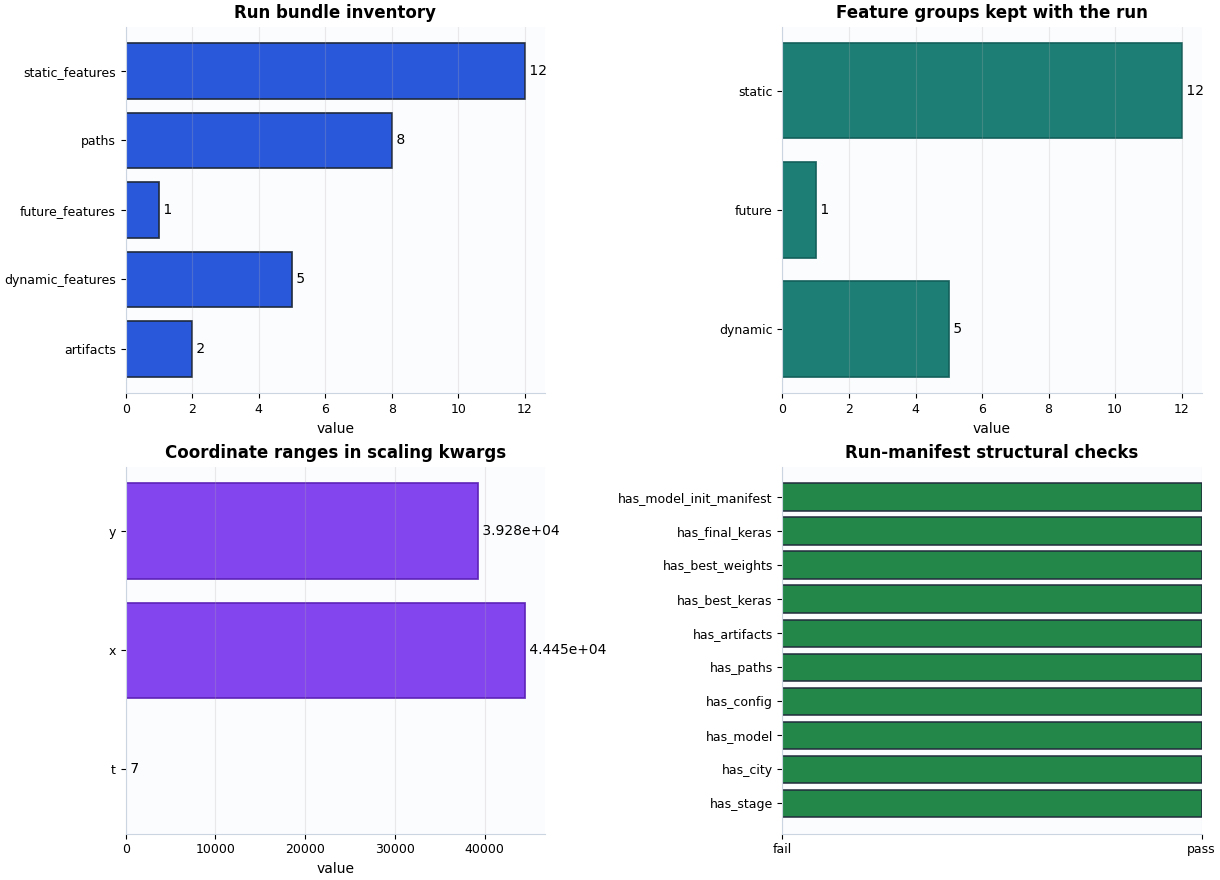
How to read these four views#
- Inventory plot
This plot is about completeness. A suspiciously small path count often means the run exported less than expected, or that the manifest was written before the bundle was fully assembled.
- Feature-group plot
This plot is about interpretability. If dynamic, future, or static groups are missing unexpectedly, later diagnostics may be hard to explain because the trained run no longer matches the intended Stage-1 setup.
- Coordinate-range plot
This plot is about scaling context. Large numeric ranges are not bad by themselves, but they should be plausible for the chosen coordinate system and time span.
- Structural-check plot
This plot is about go/no-go decisions. It answers whether the core bundle is present: config, paths, artifacts, best model, final model, and the init manifest.
A practical reading rule#
A run manifest usually looks healthy enough for downstream work when:
stage, city, and model are present,
config / paths / artifacts blocks exist,
best and final model paths are recorded,
the model-init manifest path is available,
scaling context still contains coordinate and feature metadata.
This rule does not say the run is scientifically good. It only says the run bundle looks well-formed and ready for the next inspection step.
must_pass = [
    "has_final_keras",
    "has_best_keras",
    "has_best_weights",
    "has_model_init_manifest",
]
ready = all(bool(summary.get(name, False)) for name in must_pass)
ready = ready and int(summary.get("path_count", 0) or 0) >= 4
ready = ready and int(summary.get("dynamic_feature_count", 0) or 0) > 0
ready = ready and int(summary.get("static_feature_count", 0) or 0) > 0

print("\nDecision note")
if ready:
    print(
        "This demo run manifest looks structurally ready for "
        "downstream Stage-2 review, evaluation, or inference steps."
    )
else:
    print(
        "This run manifest needs attention before you rely on it for "
        "later workflow steps."
    )
Decision note
This demo run manifest looks structurally ready for downstream Stage-2 review, evaluation, or inference steps.
Bridge to real workflow use#
In practice, replace the temporary demo path with the real
run_manifest.json saved inside your training run directory.
A good workflow habit is:
inspect the run manifest,
open the model-init manifest if the config looks unexpected,
open the training summary if the bundle is complete,
only then move to evaluation or inference artifacts.
Total running time of the script: (0 minutes 0.367 seconds)